Screenshots

App details
- Updated
- Jun 27, 2023
- Language
- English,Spanish
- Developer
- ArcticLine Software
- Category
- Mobile
SoftPas in:
This product is also available in the following languages:
About Folder Marker
Download Folder Marker – Custom Folder Colors, Icons & Personalization Tool
Overview
Folder Marker is a lightweight utility designed to enhance desktop organization through visual customization. The application enables users to modify the color and icon of folders, transforming the standard yellow folder into a personalized element that stands out on the desktop. This simple yet effective tool addresses the common challenge of folder identification, especially in environments with numerous files and directories. By allowing users to assign distinct colors and icons, Folder Marker improves visual recognition, reducing time spent searching for specific folders.
The app is particularly useful for individuals managing large volumes of digital content, such as students, freelancers, and professionals in creative or administrative roles. Its focus on aesthetics and usability makes it a valuable addition to the desktop toolkit. The developer, Jason A. Bilbrey, has created a tool that prioritizes simplicity and accessibility, with no complex setup required. Although the developer did not provide additional technical details, the application’s small size and free availability suggest a streamlined design focused on core functionality.
Folder Marker fills a niche in the utility category by offering a straightforward solution to a visually driven organizational need. In an ecosystem where productivity tools often emphasize automation and integration, this app stands out by enhancing human-centric interaction with digital spaces. Its ability to improve folder recognition through color and icon changes contributes to a more intuitive and efficient workflow.
Key Features & Functionality
- Change Folder Colors: Users can replace the default yellow folder color with a variety of options, including black, orange, red, and green. This feature enhances visual distinction, making it easier to identify folders at a glance, especially in cluttered desktop environments.
- Replace Conventional Icons: The app provides a selection of built-in icons that can be applied to folders, offering a quick way to differentiate between project types, departments, or file categories without altering the folder’s content.
- Use Custom Icons: Folder Marker supports the use of user-defined icons, allowing for complete personalization. This feature is ideal for users who want to incorporate brand logos, personal artwork, or thematic symbols into their folder design.
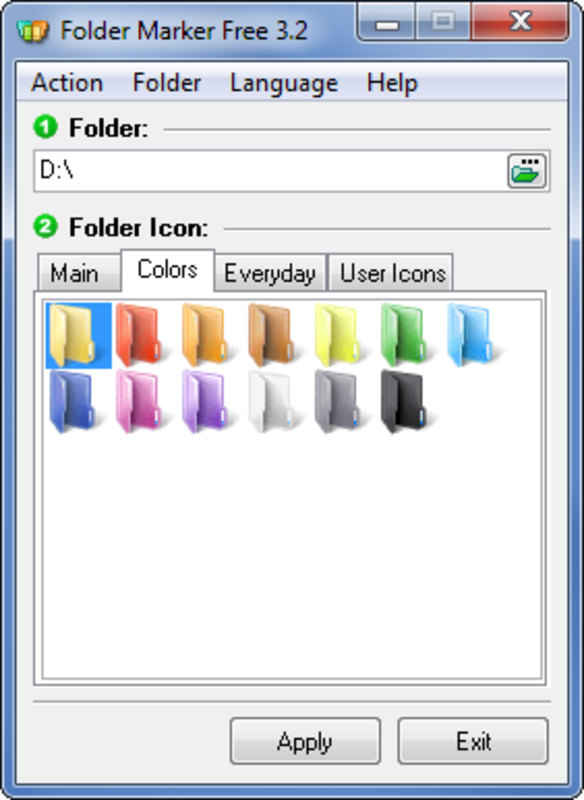
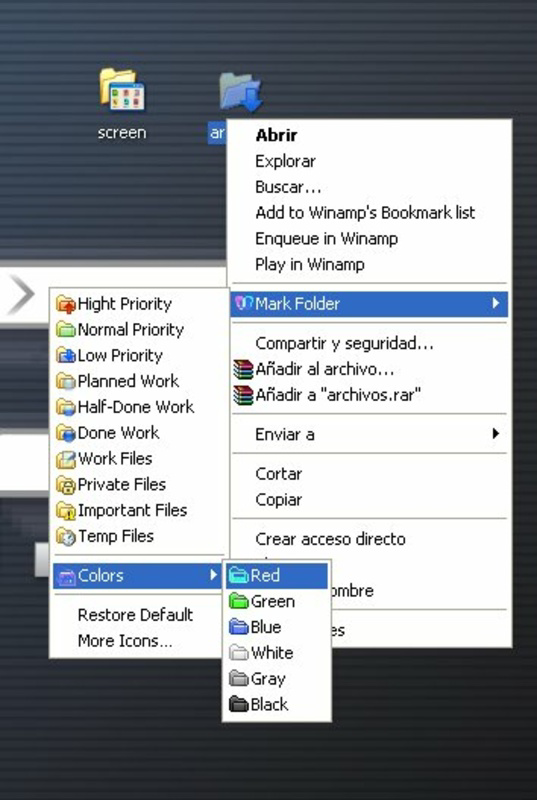
- Easy Icon Modification: Customization can be performed directly through the application’s interface or via the right-click contextual menu, ensuring that changes are made quickly and without requiring technical knowledge.
- Improved Folder Recognition: By applying unique visual cues, users can identify the purpose or content of a folder instantly, reducing cognitive load and improving workflow efficiency.
For example, a student might use red folders for assignments due this week, green for completed tasks, and blue for research materials. A graphic designer could assign custom icons representing different clients or project phases. These real-world applications demonstrate how Folder Marker transforms a basic file management task into a visually intuitive system.
Interface, UX & Performance
Folder Marker features a clean, minimal interface that prioritizes ease of use. The main window displays a straightforward list of folders on the system, with color and icon previews visible at a glance. Navigation is intuitive, with clear buttons for applying changes and selecting new icons. The right-click context menu integration ensures that users can modify folders without opening the application, streamlining the workflow.
The visual style is unobtrusive and consistent with standard Windows design principles, avoiding distractions while maintaining functionality. Although the developer did not list formal performance metrics, the app’s small file size of 2.8 MB suggests efficient resource usage. It is expected to run smoothly on most modern Windows systems without impacting system responsiveness or startup time.
Responsiveness is maintained across different device categories, including desktops and laptops, though specific compatibility details were not disclosed. Stability appears to be a focus, as the app operates without requiring constant updates or background processes. Users can expect consistent behavior when applying changes, with no reported issues related to crashes or data corruption.
Platform Compatibility & Technical Requirements
Folder Marker is designed for the Windows platform and is compatible with current and recent versions of the operating system. The software version is 2.5.0, with a file size of 2.8 MB, making it a lightweight download suitable for systems with limited storage. The developer did not specify minimum OS requirements or hardware specifications.
Given its small footprint and free pricing model, the app is likely optimized for low-resource environments. It does not appear to require additional dependencies or runtime frameworks. The lack of detailed technical information suggests that the application is designed to work out-of-the-box with minimal setup, appealing to users who prefer plug-and-play tools.
Pros and Cons
Pros
- Lightweight and fast, with a minimal file size of 2.8 MB.
- Free to download and use, with no hidden costs or ads.
- Simple, intuitive interface suitable for users of all skill levels.
- Supports both built-in and custom icons for maximum personalization.
- Right-click menu integration allows for quick folder modifications.
Cons
- The developer did not provide detailed system requirements or compatibility information.
- Only available for Windows, limiting cross-platform use.
- No built-in backup or undo feature for applied changes.
- Custom icon support may require users to prepare files in specific formats.
- Updates and future development plans were not disclosed.
FAQ
Is Folder Marker safe to download and install?
Yes, Folder Marker is a free utility developed by Jason A. Bilbrey. The app does not contain malware or intrusive behavior. It operates locally on your system and does not require internet access to function.
Can I use custom icons with Folder Marker?
Yes, the app supports the use of custom icons. Users can apply their own image files as folder icons, provided they are in a compatible format such as .ico, .png, or .bmp.
Is Folder Marker available for macOS or Linux?
Currently, Folder Marker is only available for the Windows platform. There is no official version for macOS or Linux.
How do I revert a folder’s appearance to default?
While the app does not include a built-in undo feature, users can restore a folder’s original appearance by removing the custom color and icon settings through the application or by resetting the folder’s attributes manually.
Does Folder Marker require admin rights to run?
The developer did not specify whether administrative privileges are required. However, based on typical behavior of similar utilities, it may function without elevated permissions on most systems.
Final Thoughts
Folder Marker delivers a focused, effective solution for users seeking to improve desktop organization through visual customization. Its ability to change folder colors and icons enhances both functionality and aesthetics, making it easier to manage digital files with minimal effort. The app’s simplicity, free access, and lightweight design make it a compelling choice for anyone looking to personalize their Windows desktop.
While it lacks advanced features like cloud sync or batch processing, its core purpose is executed flawlessly. The tool is ideal for students, creatives, and professionals who value clarity and visual efficiency in their digital workspace. For those who want a quick, secure way to organize their folders with a personal touch, Folder Marker offers real value.
Download Folder Marker now
Guides & Tutorials
How to install Folder Marker
- Click the Download button above.
- Once redirected, accept the terms and click Install.
- Wait for the Folder Marker download to finish on your device.
How to use Folder Marker
This software is primarily used for its core features described above. Open the app after installation to explore its capabilities.
User Reviews
No reviews yet. Be the first to share your experience.
You may also like
more
Que no te pillen¡
About !Que no te pillen¡Reviewed by Jason A. BilbreyShow MoreShow Less

3D Combat Zone
About 3D Combat ZoneOriginally released in 1983, 3D Combat Zone immerses players...

666: El día del portal
About 666: El día del portalOn June 6, 2006, Agent P. Stone uncovers a sinister...

80 in 1 Best Flash games
About 80 in 1 Best Flash games 80 in 1 Best Flash games is a collection of 80 fl...

ABYSS SEEKERーーWhat Do You See Deep in The Abyss
About ABYSS SEEKERーーWhat Do You See Deep in The AbyssIn ABYSS SEEKER, players...

ACA NEOGEO THE KING OF FIGHTERS 2002 for Windows
About ACA NEOGEO THE KING OF FIGHTERS 2002 for WindowsTHE KING OF FIGHTERS 2002,...